Beyond the basic training you received at MortgageFieldServices.com, let’s discuss how to keep our clients happy.
These things set NMFS apart and are most appreciated by our clients.
Staring at our photos.
Do not provide less than (8) eight photos.
- Front
- Front Left Side
- Front Right Side
- Street Sign
- Address
- Neighborhood
- (2) Occupancy Indicators
These are the bare minimum.
Always take your photos first before approaching the front door.
That way, if the homeowners come out and get all huffy because they are behind on their payments and ask us to leave, we already have all of our photos.
These are the photos that set NMFS apart from our competitors and help ensure that we continue to receive inspections.
Price is one thing, but if clients really like our photos, they will continue to pay above-average fees.
Our front photos should be corner-to-corner with a little airspace on the sides. They need to be of the front of the house, as straight on as possible.

Front Left / Front Right
Some inspectors think that this means, after they stand there taking their front photo, they remain there, turn a little to the left and right, and take photos of the front right or left.
This is NOT how we do it.
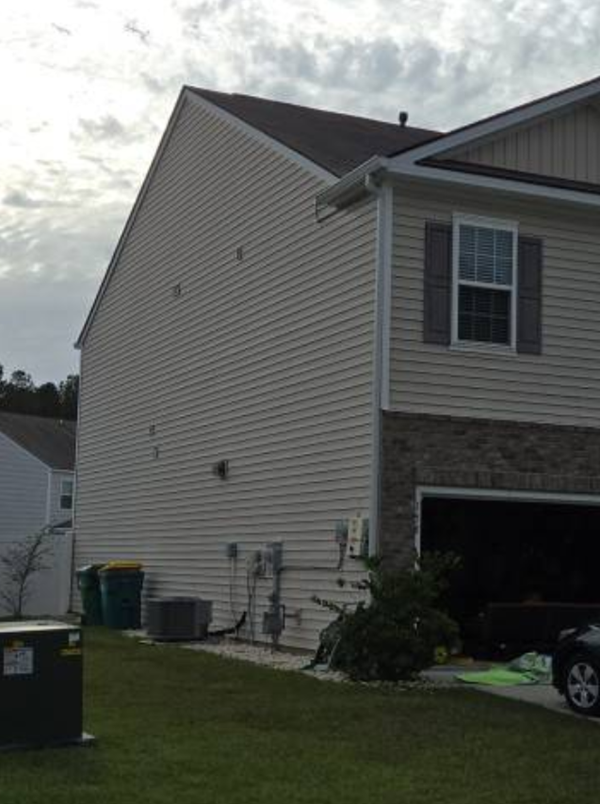
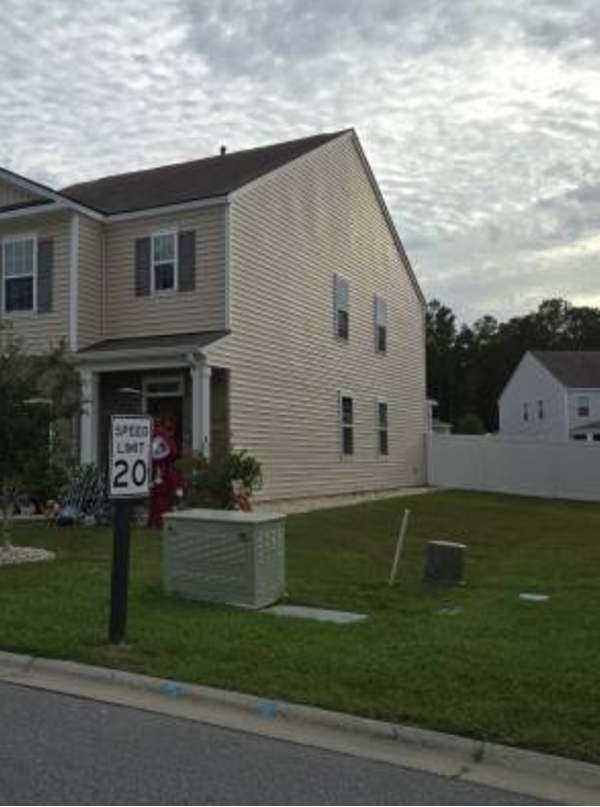
A Front Left/Right means from the front, down the side. You need to move your body to take the following photos. Like these:

This provides a better representation of what the property looks like. Label it; Side View.

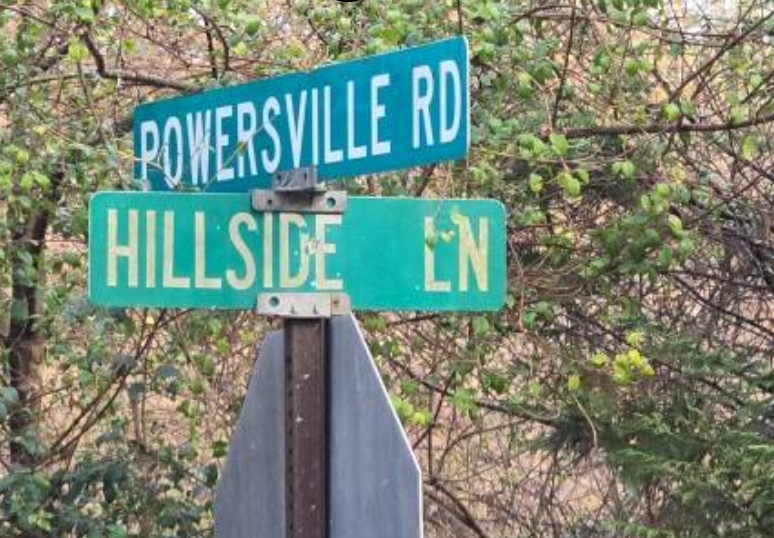
Street Signs
Street Signs are a biggy and one of the most complained about photos. They can’t read the photos!
Street sign photos should focus on the sign itself, not the cars parked down the street or the houses in the neighborhood; we need better street sign photos.
There should be no more than a 2′ x 2′ area of the street sign, and if it sits on top of a stop sign, maybe no more than half the stop sign.


Address Photos
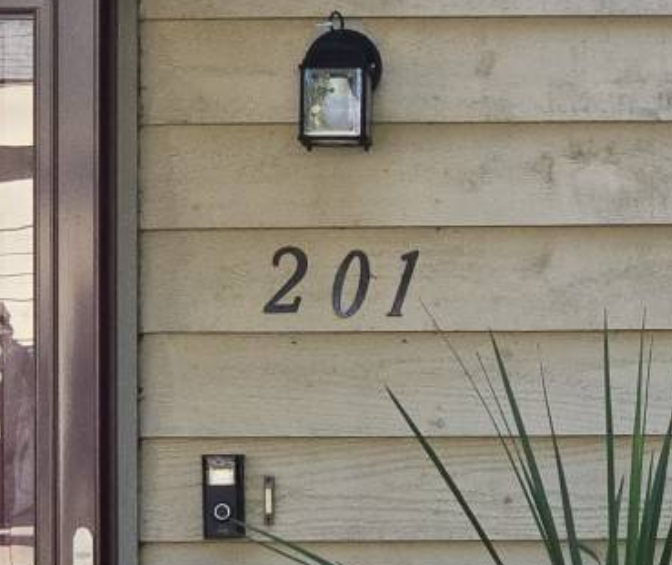
Address Marker photos should be all about the address. If on the house, mailbox, curb, or anywhere else, take a 2′ x 2′ photo of the numbers and a little outside of the numbers to show where it is located.

Neighborhood Photos
Neighborhood, Street Scene, Street View, all mean the same thing. While in the front of the house, stand in the middle of the street and point down either end. Some inspectors focus on the middle of the street and slightly right or left to show what the houses look like for a better neighborhood view.
Occupancy Photos
You know what occupancy photos are: those are the car in the driveway, the cat in the window, kids’ bikes on the lawn, trash cans set to the curb as everyone else, water hose, grass cut, personal items, rocking chair, porch light on, etc. Whatever it is that you are seeing that makes you feel it is occupied, take a couple of photos of that!
GPS Photos
We need a GPS photo! Android users, easy. Open your inspection and tap the Images tab on your phone app. It will then give you the option to choose Camera or GPS. iPhone users hit your Photos button or Camera, or whatever it is called, the tab down at the bottom, click that, and you will see outside of the framed photo, the word Menu, or Done, or some icon. Play around with it, but we need that GPS photo. It shows your location with a blue dot in the middle with the address and coordinates already on it. Just hit the Take Screen Shot button. Label it House/Address or something. All of our clients require this photo, and maybe in a few years, they’ll give us a label that says GPS.
What we MUST stop doing, urgently, is taking the same photos, 5 or 6 times to fulfill your number requirement of photos. This is lame thinking. We need 8-10 UNIQUE photos, not the same photo repeated over and over. What good does that do for anyone? What it does is make our clients think we are morons. Who does that? We need unique photos!
ECD’s
Estimated Completion Date. NMFS started providing these services over two years ago. NMFS are pioneers in the industry when it comes to ECD’s. When we first started providing ECD’s the inspector had to log into their IA account online, as we do now, but back then the inspector had to write the words ECD: x/x/x for the date and then click the button to send it to that particular manager. On each individual inspection, one by one. That was a real pain. On our side, we had to then forward all those emails, one by one to our clients. This took hours each day.
Now, in 2025 InspectorADE built us a module that all companies can use, and they call it ECD Tools. The process is extremely simple and only takes two seconds. We all know how to provide an ECD. But Why?
NMFS is what they call a Super Regional. Any company that can provide services for 8 states or more is called a Super Regional. We are in 42 states. The average fee for these inspections nationwide is about $4 per inspection. NMFS has a policy to pay no less than $6 per inspection. We can keep getting our inspections as long as we tell our clients WHEN we will submit the inspection. You guys already know the rules, but you need to know the reasons why.
When created by the inspector, the ECD will automatically send this notification directly to the client. (That is why we want you to refrain from also providing a comment. ) We just want the calendar date. Our clients, in turn, forward your email that is automatically generated to their clients, the actual mortgage company, and the bank. When we miss an ECD, everyone up the chain gets in trouble. Don’t miss an ECD.
But the “why” can be explained simply: This is how we stay in business. In fact, four of our major clients will now reassign an inspection after 3 days or on the due date if it does not have an ECD. This industrywide requirement has really worked out to the benefit of NMFS. Except when the tables are turned, and they take and reassign our inspections because we failed to provide an ECD. That is taking money from our business and will not be tolerated. If an inspector has no thoughts about losing money for NMFS, then we have to let those inspectors go for the sake of those who earn their livelihood doing inspections.
InspectorADE Communication
The preferred method of communication with our inspectors and back to our staff is using the Comments section found on each inspection. Open it online on InspectorADE.com and click on the Info/Comments tab.
Use this to communicate with the NMFS Staff. Sending us individual texts or emails only goes to the person you sent it to, but this is not a good way to communicate. My entire staff needs to see your comment, and this documents what you want to say to us so that it is a permanent record. We can communicate to our inspectors using InspectorADE.com in one or all of three different ways.

But let me tell you this about the texts sent to you from us as we communicate using the text box. When you receive a text message that we send to you through the InspectorADE text system, you must not reply to it. They go nowhere. Have you replied to one of our texts and wondered why we are not responding? It doesn’t work that way. Those texts you receive from InspectorADE are sent from a non-reply addresses. We never see them. If you want to reply to a text, you must enter our phone numbers and reply that way. But they go nowhere if you try to respond to our texts from within InspectorADE.
-End