ECD stands for Estimated Completion Date.
As an NMFS inspector, as part of your job requirements, as indicated in our contract agreement, you must log in to your InspectorADE account and provide us with your ECD. You do that by going to your Open inspections.
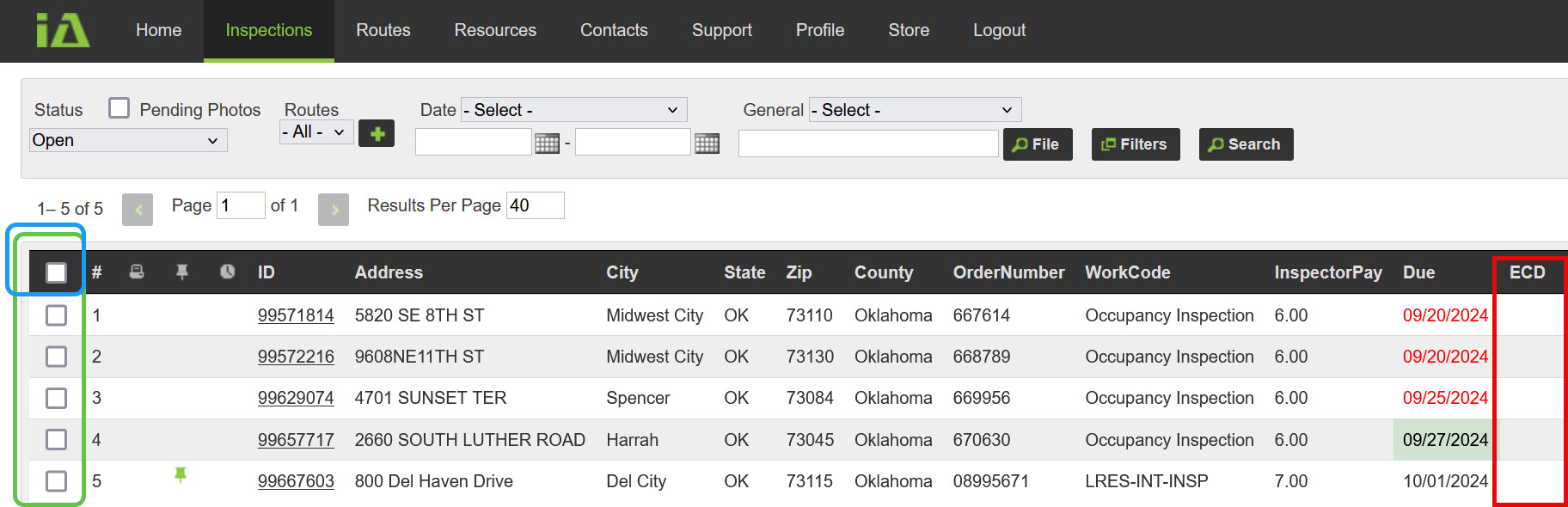
You will see blank checkboxes on the left. You can select the blank box in the black menu area at the top to select all inspections at once, or you can click on the individual inspections.
Take note of the ECD column. This is a quick way to tell you that you need an ECD.
Once you select the boxes, the buttons on the bottom will light up, and now you can click the ECD Tools button.

This opens a dialog window. Change the date to reflect the day you are going to complete the inspection. Hit Save, Done.
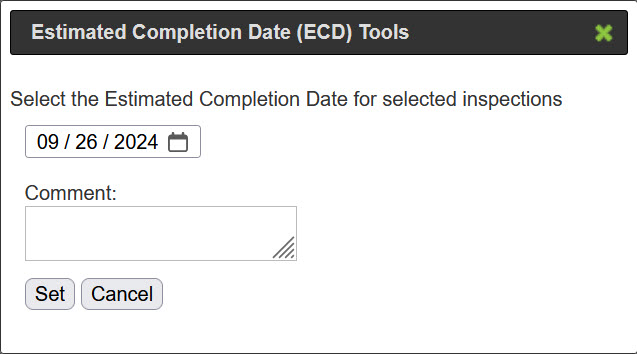
Please, do not write anything in the Comment box. Once you hit the “Set” button, these ECDs go directly to the client. So let’s keep it simple. No comments are needed.
This entire process takes approximately…2 seconds.
Don’t Be Surprised.
We require an ECD within the first 24 hours. You will get a warning first. After 48 hours without an ECD, back charges of $1 per day start. Those only last a few days because more than 3, we terminate your contract.
We must have ECDs to stay in business.
What ECD Do You Provide?
The ECD should be set for three days from the date it was assigned to you, or the due date, whichever is further out. Not when you first see it, but when it is assigned to you. Our contract states that we must allow our inspectors three days to complete inspections unless there is a rush fee involved.
NMFS often receives inspections that are already past due. (This is a good thing.)
What would the ECD be?
Three days out.
What if you get an inspection not due for another 8 days? It would be the due date, 8 days from now.